Hi All, this blog is all about showing you how to Extending Hardisk of Redhat-Virtual(Machine)-Vmware-WorkStation 16 Player, partioning and how to point a permanent mount to a directory in redhat 8
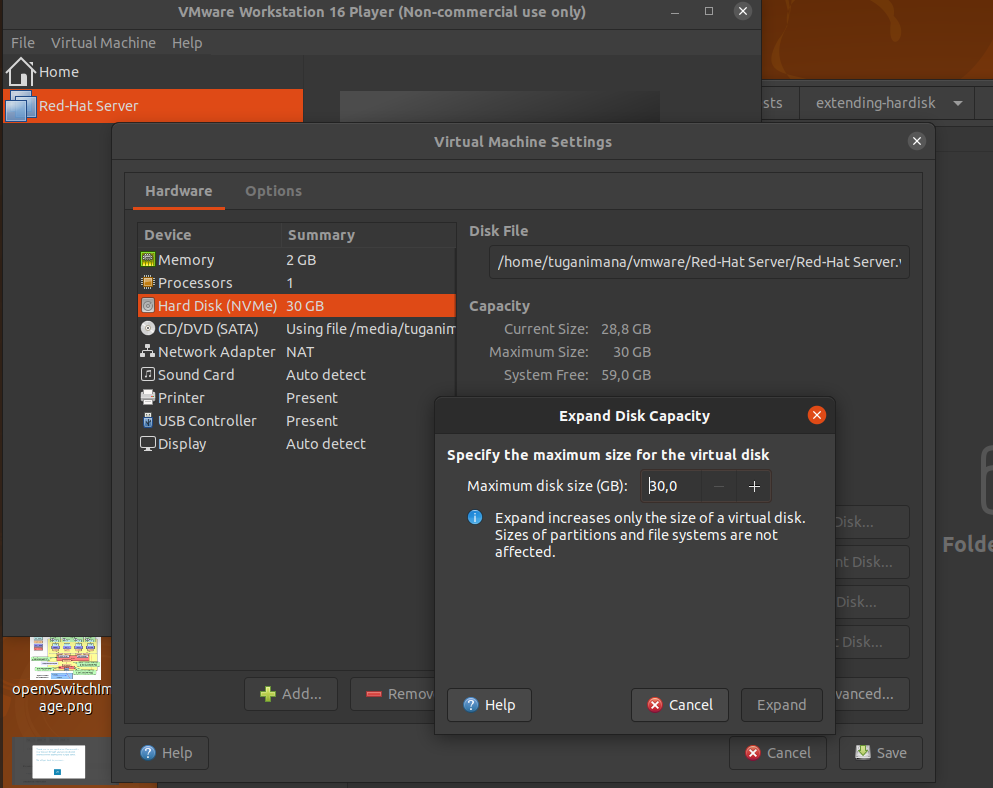
- open vim-ware workstation 16 player and click
virtual machine settings
hard disk
maximum disk size click on plus sign to increase the size of the disk
click on expand disk
once done you will see a prompt saying 'the disk was successfully expanded'
click okay - start your virtual machine this demo will use redhat 8
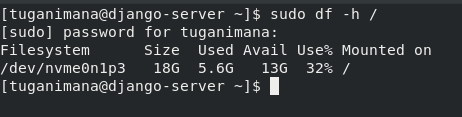
- this snippet shows the size of my file system folder starting from the root directory, so what i want is to add a new partition which has 10Gib and point this particular partition to a specific folder called repo, because i will need to create a local repository for my system. repository files might be bigger than 7Gb and i don't want repository files to consume size on my file system.
- type the fdisk -l to see all available partion on disk you will see that the 10Gb was not listed in all availabe disks

- check the name of the disk you can see our current hardisk is called
/dev/nvme0n1,with 3 primary partitions on it (/dev/nvme0n1p1,/dev/nvme0n1p2,/dev/nvme0n1p3)

- as you know BIOS use MBR which allow us to create 4 partition only where 3 partion should be primary partions and the fourth one will be extended partition so we are going create 4th partion here which will be extended partion,
lextended partion allow us to create many logical partion on top of it. if you are using modern UEFI then don't worry b'se it uses GPT which allows you to create up to 128 partitions instead of 4
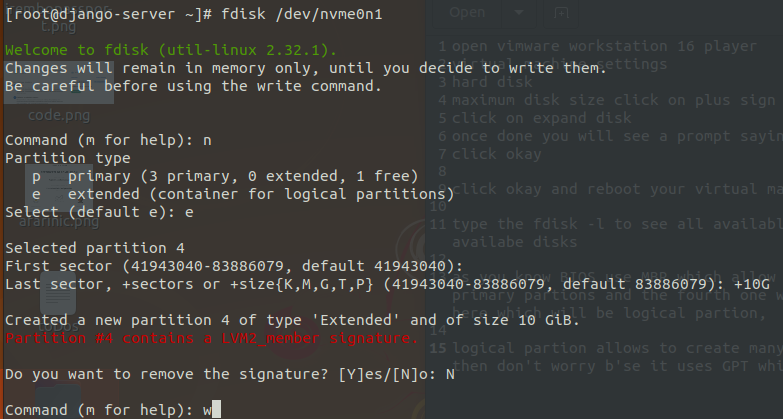
- next you will need to reboot you system for the changes to take effect, after a reboot type
fdisk -las root again you will have something like this

- It is time to create logical partition on top of extended partition type
fdisk name-of-your-extended-partition
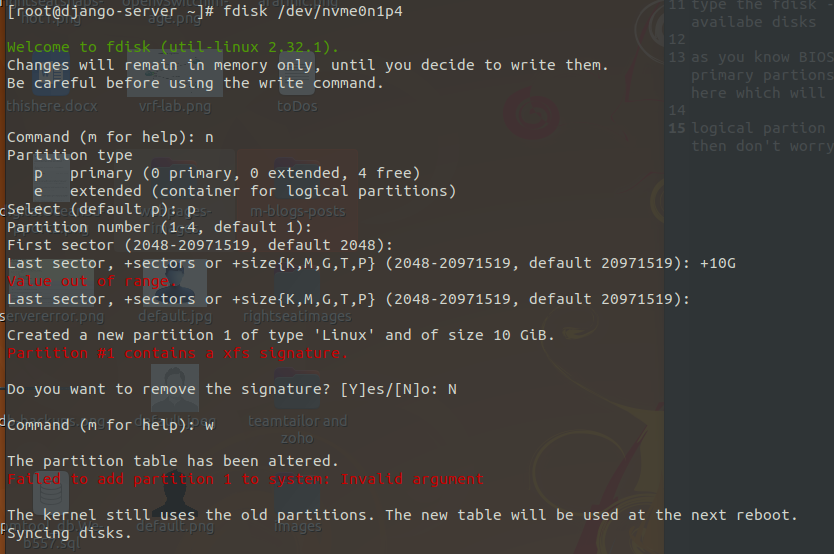
9.after rebooting your system type fdisk -l, you will see new logical partition

- It is the time to point this partition to a specific folder create a folder i've created a folder on root called repo and and this entry in
etc/fstabfile which contain all permanent mounted partitions

save the file and quit by default redhat 8 comes with xfs file system but if you want to change to ext4 or any other for flexibility you can do that as well, finally you will need to give your partion any file system of you choice here is the command for xfs
mkfs.xfs /dev/nvme0n1p5,if it is ext4 it will be likemkfs.ext4 /dev/nvme0n1p5
And then the last commant will be mount -a which will tellredhat system that the record added in /etc/fstab needs to be mounted permanently in /repo folder
- type df -h, df is for disk free and -h is for printing the size of disk in human readable format
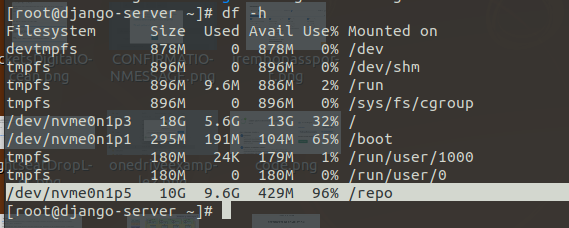
As you see above our partion is pointing to /repo folder
Thank you so Much | Murakozeeee!!! cyange ,next blog i will show you how to create local repository on redhat 8 if you have a question or need to ask me something please fell free to contact me
More from our blog
> This blog will show you how to resolve Parked free error page issue during you site hosting. read more
Error Netlify CMS
> this blog will show you how to handle this error Error loading the CMS Configuration while trying to use Nelify cms read more
Django and Msql(Ubuntu)
> This blog will show you how to use MySQL instead of using default Db SQLite provided by Django Framework. im using ubuntu linux read more
Spring Boot project
> Hello This is a Spring boot Web Application you Can Download it And Change the source codes the way you want read more
vmrun has returned an error: Unable to connect to host
> how to fix "`vmrun has returned an error: Unable to connect to host`" error provided by gns3 when trying to connect to a vmware host read more
Creating Local Repository | Redhat Image 8.5
> This blog is all about creating local repository by using rhel-8.5-x86_64-dvd.iso Image read more