Hi guys, let me show you what i did to solve this issue i'm using ubuntu desktop 20.04,
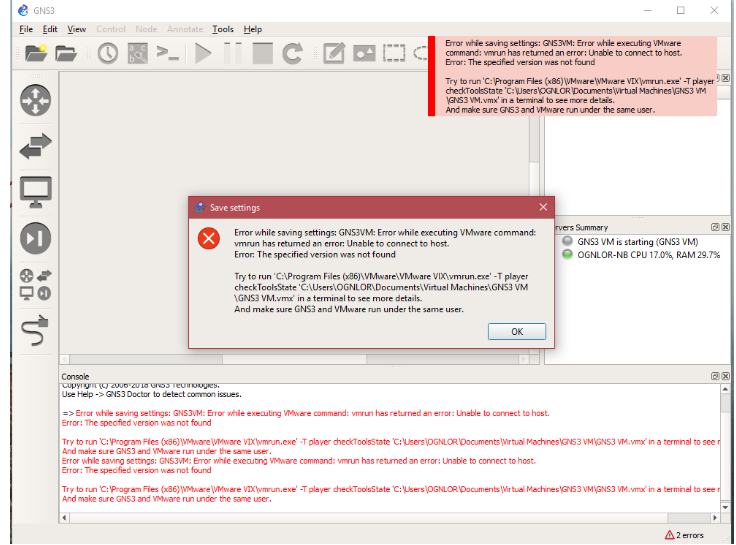
first of all what i wanted was to install VMware-Player-16.1.2 and vim Api VMware-VIX-1.17.0 but connection between vmware and gns3 was not working while trying to start windows seven host in exercise and i got such error
Here is the solution first unistall VMware-Player-16.1.2 by using this command vmware-installer -u vmware-player and then remove vimware-vix if it is installed like this vmware-installer -u vmware-vix on windows you will unistall it the way we used to uninstall softwares
check if the file are removed successfully
On a Windows system:
C:\Program Files\VMware\VMware VIX\vix.h
C:\Program Files\VMware\VMware VIX\vm_basic_types.h
On a Linux system:
/usr/include/vmware-vix/vix.h
/usr/include/vmware-vix/vm_basic_types.h
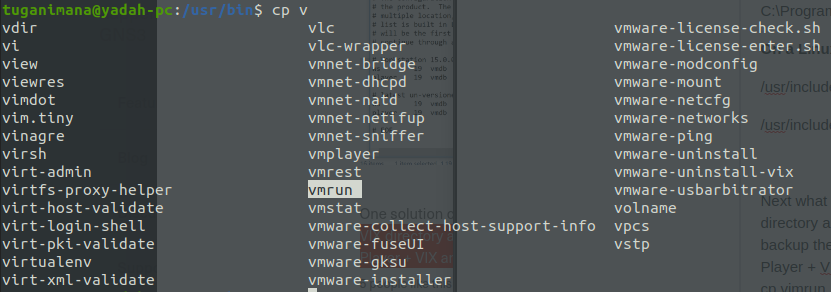
Next what you will need to do is to install trial of vmware-workstation pro download it here browse the Download directory and install it like this sudo bash VMware use tab to display full string. after installation you will need to backup the /usr/include/vmware-vix directory and vmrun file in /usr/bin, then uninstall the Pro version and install Player + VIX and finally copy backed up files i.e vix.h and vm_basic_types.h files to /usr/include/vmware-vix/ and cp vimrun back to /usr/bin.
For windows users check VIX directory and vmrun.exe (in the Workstation directory), then uninstall the Pro version and install Player + VIX and finally copy backed up files to the standalone VIX directory. This will work it means you are using vmware-player by using files of vimware-workstation pro i think this is clear.
These are the file that need to be backed up

More from our blog
> This blog will show you how to resolve Parked free error page issue during you site hosting. read more
Error Netlify CMS
> this blog will show you how to handle this error Error loading the CMS Configuration while trying to use Nelify cms read more
Django and Msql(Ubuntu)
> This blog will show you how to use MySQL instead of using default Db SQLite provided by Django Framework. im using ubuntu linux read more
Spring Boot project
> Hello This is a Spring boot Web Application you Can Download it And Change the source codes the way you want read more
Extending Hardisk size of Redhat-Virtual(Machine)-Vmware-WorkStation 16 Player
This blog will show you step by step how to Extending Hardisk of Redhat8-Virtual(Machine)-Vmware-WorkStation 16 Player, read more
Creating Local Repository | Redhat Image 8.5
> This blog is all about creating local repository by using rhel-8.5-x86_64-dvd.iso Image read more