Django is A Popular Framework for creating web based application so i'm going to show you how to connect A Django project to Mysql database and I'm using ubuntu 20.04 distribution
navigate in your django project and place this line of code in setting.py file
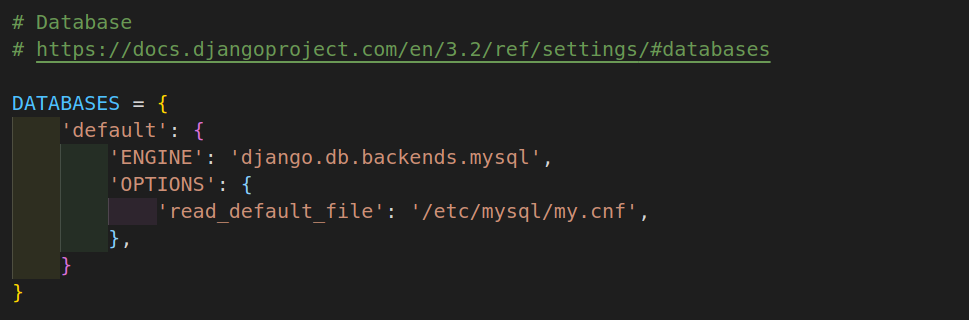
this line 'ENGINE': 'django.db.backends.mysql', means that django will use mysql instead of mysqlite and django will check database configuration details in a file called my.cnf it is located in /etc/mysql you can create this file and rename it with anything you want but make sure it ends with .cnf right?
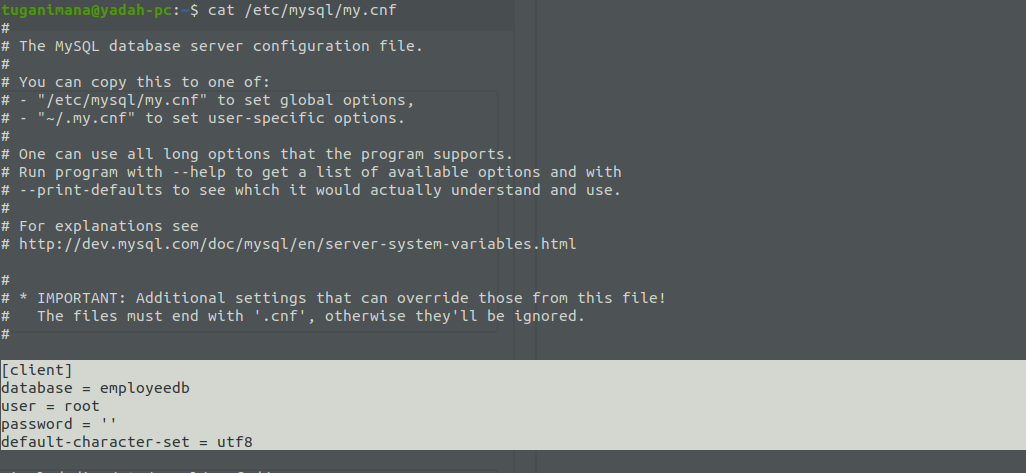
here are details in my.cnf file, ignore those comments what is important in this file is the selected last options you can see that the user is root,and password is empty in this case and the nameof the database is employedb, if you are using different user other than default you can change it accordingly
After doing all this you will need to make some few commands to check if it works, firstly, create a database for instance employedb and in your do migrations ptyhon commands you will be able to see all default generated tables from Django
Thanks
More from our blog
> This blog will show you how to resolve Parked free error page issue during you site hosting. read more
Error Netlify CMS
> this blog will show you how to handle this error Error loading the CMS Configuration while trying to use Nelify cms read more
Spring Boot project
> Hello This is a Spring boot Web Application you Can Download it And Change the source codes the way you want read more
vmrun has returned an error: Unable to connect to host
> how to fix "`vmrun has returned an error: Unable to connect to host`" error provided by gns3 when trying to connect to a vmware host read more
Extending Hardisk size of Redhat-Virtual(Machine)-Vmware-WorkStation 16 Player
This blog will show you step by step how to Extending Hardisk of Redhat8-Virtual(Machine)-Vmware-WorkStation 16 Player, read more
Creating Local Repository | Redhat Image 8.5
> This blog is all about creating local repository by using rhel-8.5-x86_64-dvd.iso Image read more